Hintergrund entfernen
Bild hochladen
Modell
Hintergrund entfernen
KI-gestützte automatische Hintergrundentfernung für Produkte, Personen, Tiere und Grafiken — schnell und präzise.
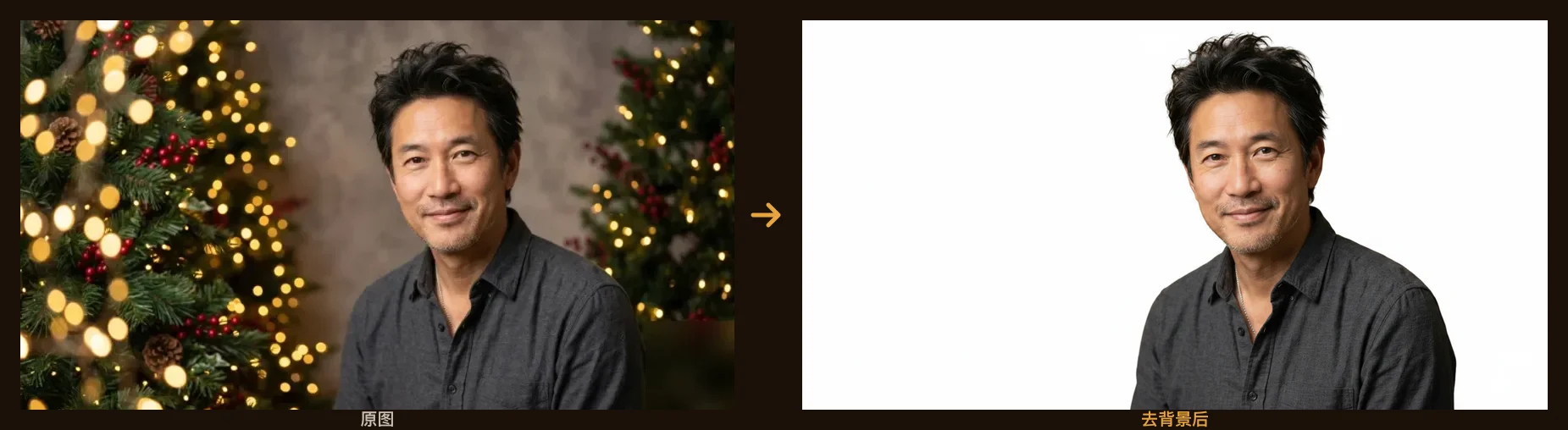
Beispiel: einen unruhigen Hintergrund mit einem Klick entfernen. Lade dein Bild hoch, um zu starten.
So entfernst du den Hintergrund eines Bildes
- 1
Lade dein Foto hoch — JPG, PNG oder WebP, bis zu ein paar Megabyte. Personen, Produkte, Tiere und Grafiken funktionieren alle.
- 2
Die KI erkennt das Motiv und stellt es frei — mit scharfen Kanten an Haaren, Fell und feinen Details.
- 3
Ergebnis ansehen und herunterladen — dein Motiv steht auf einem sauberen weißen Hintergrund, bereit für den nächsten Schritt.
Wofür Hintergrundentfernung genutzt wird
Produktfotos für E-Commerce
Stelle jedes Produkt auf einen einheitlich sauberen Hintergrund für Amazon-, Shopify- und Etsy-Listings.
Profilbilder & Bewerbungsfotos
Stelle eine Person frei für LinkedIn, Lebenslauf, Team-Seiten oder ein Passfoto mit einfarbigem Hintergrund.
Marketing- & Social-Grafiken
Setze das freigestellte Motiv in Thumbnails, Anzeigen, Banner und Poster — ohne unsaubere Kanten.
Design & Druck
Montiere Motive in neue Szenen, Collagen und Layouts — mit sauberen, bearbeitbaren Freistellern.
Häufige Fragen
Ist die Hintergrundentfernung kostenlos?
Ja. Neue Konten erhalten bei der Anmeldung 20 Gratis-Credits und täglich 10 weitere — du kannst also jeden Tag kostenlos Hintergründe entfernen. Bezahlte Credits schalten Ergebnisse ohne Wasserzeichen, mit kommerzieller Nutzung und höherer Auflösung frei.
Welche Bildformate kann ich hochladen?
JPG, PNG und WebP werden unterstützt. Lade ein scharfes Foto deines Motivs hoch, den Rest übernimmt die KI — ohne manuelle Auswahl oder Maskierung.
Kommt es mit Haaren und feinen Details zurecht?
Ja. Das Modell ist darauf abgestimmt, saubere, natürliche Kanten an Haaren, Fell und feinen Details zu erhalten — genau dort, wo Lasso oder Zauberstab scheitern.
Darf ich die Ergebnisse kommerziell nutzen?
Ergebnisse mit bezahlten Credits sind ohne Wasserzeichen und mit vollen kommerziellen Nutzungsrechten. Ergebnisse im Gratis-Tarif tragen ein kleines Wasserzeichen für Test und private Nutzung.
Worin unterscheidet sich das vom manuellen Freistellen?
Manuelles Freistellen in Photoshop dauert pro Bild Minuten und erfordert Übung bei Haaren und Kanten. Hier genügt ein Klick, die Kanten bleiben automatisch sauber, und es skaliert auf beliebig viele Bilder.
Kann ich das Motiv auf einen transparenten oder farbigen Hintergrund setzen?
Standardmäßig setzt das Tool dein Motiv auf einen sauberen, einfarbigen Hintergrund. Für einen anderen Hintergrund oder einen kompletten Szenenwechsel öffnest du das Ergebnis im Shotari-Editor und beschreibst den gewünschten Hintergrund.
Gibt es eine kostenlose Online-Seite zum Hintergrund entfernen?
Diese Seite ist genau das — ohne Installation, zum Ausprobieren ohne Anmeldung. Bild hochladen, einmal klicken, Freisteller herunterladen. Die täglichen Gratis-Credits decken den normalen Gebrauch; bezahlte Credits entfernen das Wasserzeichen und erhöhen die Auflösung.