
Model
Tech Headshot
Upload a reference photo and click Generate. You can generate free without an account — signing up unlocks downloads.
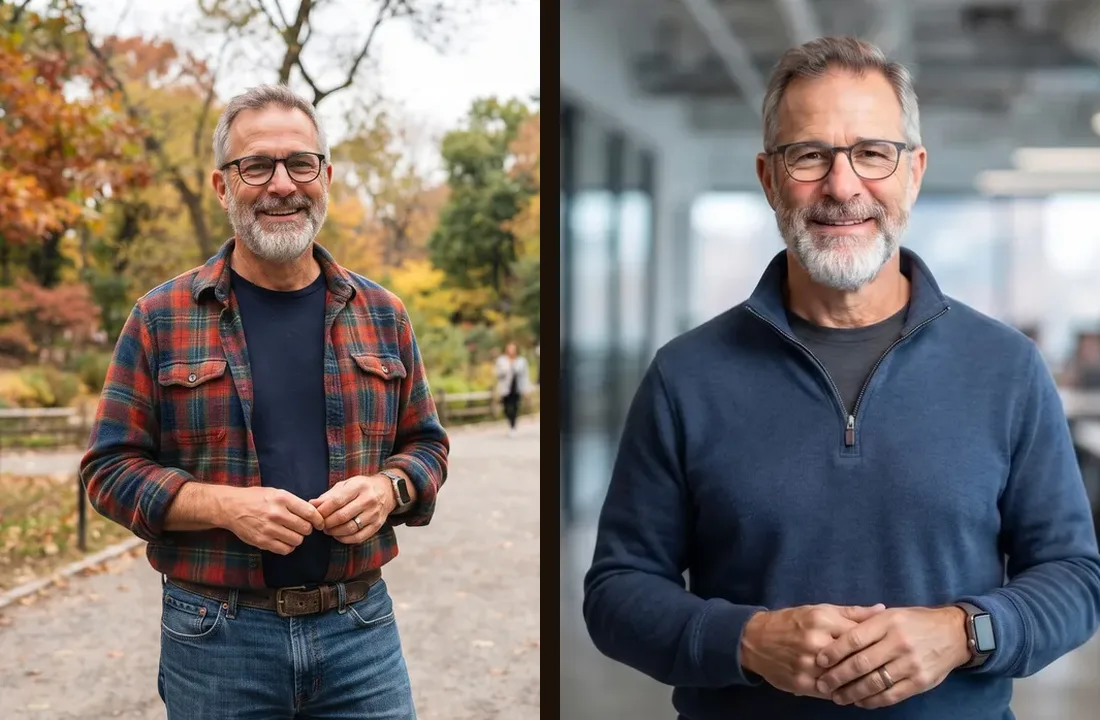
Example: before → after. Upload your image to start.
How to use the Tech Headshot template
- 1
A front-facing photo from the chest up, eyes to camera, no hat or sunglasses. The output keeps your photo's shape, so a vertical shot gives a vertical headshot.
- 2
Click Generate — the AI re-renders your photo using the template prompt shown below. It runs without an account, on Shotari Basic.
- 3
The result appears right here. Re-run any time — each generation differs slightly. Downloading needs an account.
What this template does
Turns one casual photo into a relaxed tech-industry headshot: a navy quarter-zip sweater over a t-shirt, a blurred modern open-plan office behind you and even light — less formal than a suit, still polished. Your face, hair and glasses come from your photo; the outfit, office and lighting are generated.
Template prompt
Turn this into a professional tech industry headshot: a casual navy quarter-zip sweater over a t-shirt, a softly blurred modern open-plan office background and flattering, even lighting, preserving the person's face.
Frequently asked questions
How is this different from the corporate headshot template?
Dress code. The Professional Headshot template puts you in business attire on a studio background; this one uses a casual quarter-zip and an office setting, which matches how most engineers, designers and startup founders show up on LinkedIn, GitHub or a team page.
Will it keep my beard and glasses?
Yes — they are part of the face the prompt preserves. Only the clothing, background and light change. Run it a couple of times if the first result smooths your skin more than you like.
Is this template free to use?
You can generate twice a day with no account at all. A free account adds 20 credits at signup plus 10 more daily. Downloading requires an account, and paid credits are what give you watermark-free output with full commercial rights; free-tier use is personal-use only.
Which model runs it, and what does it cost?
Shotari Basic by default, which costs 0 credits. You can switch to a premium model — Shotari Pro (2 credits), Seedream 5 Lite (3), GPT Image 2 (5), Nano Banana Pro (10) and others — but those bill paid credits, so they need a signed-in account with a paid balance. Without an account the job always runs on Shotari Basic and the page says so.