
Model
3D Glam Doll
Upload a reference photo and click Generate. You can generate free without an account — signing up unlocks downloads.
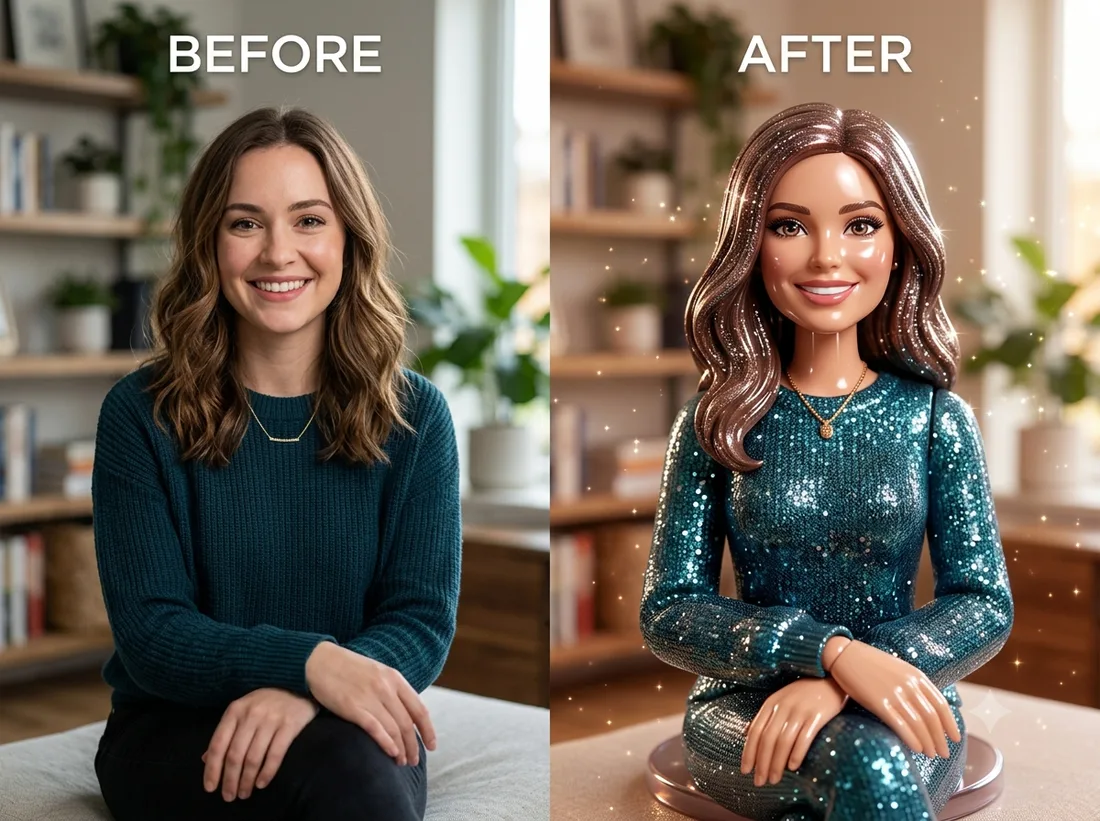
Example: before → after. Upload your image to start.
How to use the 3D Glam Doll template
- 1
A front-facing portrait. Strong makeup and defined hair read especially well, because the template is exaggerating exactly those things.
- 2
Click Generate — the AI re-renders your photo using the template prompt shown below. It runs without an account, on Shotari Basic.
- 3
The result appears right here. Re-run any time — each generation differs slightly. Downloading needs an account.
What this template does
Renders the subject as a glamorous collectible doll — glossy plastic finish, sparkly styling, the look of something in a display box. Skin becomes moulded material and hair becomes a sculpted piece, while the face stays recognisably the person you uploaded.
Template prompt
Turn the subject into a glamorous shiny 3D collectible doll figure with glossy plastic finish and sparkly glam styling, keeping their face recognizable.
Frequently asked questions
How is this different from 3D Cartoon Character?
This produces an object — a doll with a plastic surface, sitting in the world as a physical product. 3D Cartoon Character produces a character: an animated-film render with soft skin shading and expressive eyes, not something you could pick up off a shelf.
Does it keep my skin tone?
Identity is preserved, including skin tone, but the material is not: it comes back as a glossy moulded surface with doll-like highlights. That sheen is the template, not a mistake.
Is this template free to use?
You can generate twice a day with no account at all. A free account adds 20 credits at signup plus 10 more daily. Downloading requires an account, and paid credits are what give you watermark-free output with full commercial rights; free-tier use is personal-use only.
Which model runs it, and what does it cost?
Shotari Basic by default, which costs 0 credits. You can switch to a premium model — Shotari Pro (2 credits), Seedream 5 Lite (3), GPT Image 2 (5), Nano Banana Pro (10) and others — but those bill paid credits, so they need a signed-in account with a paid balance. Without an account the job always runs on Shotari Basic and the page says so.