
Model
Old Photo Restoration
Upload a reference photo and click Generate. You can generate free without an account — signing up unlocks downloads.
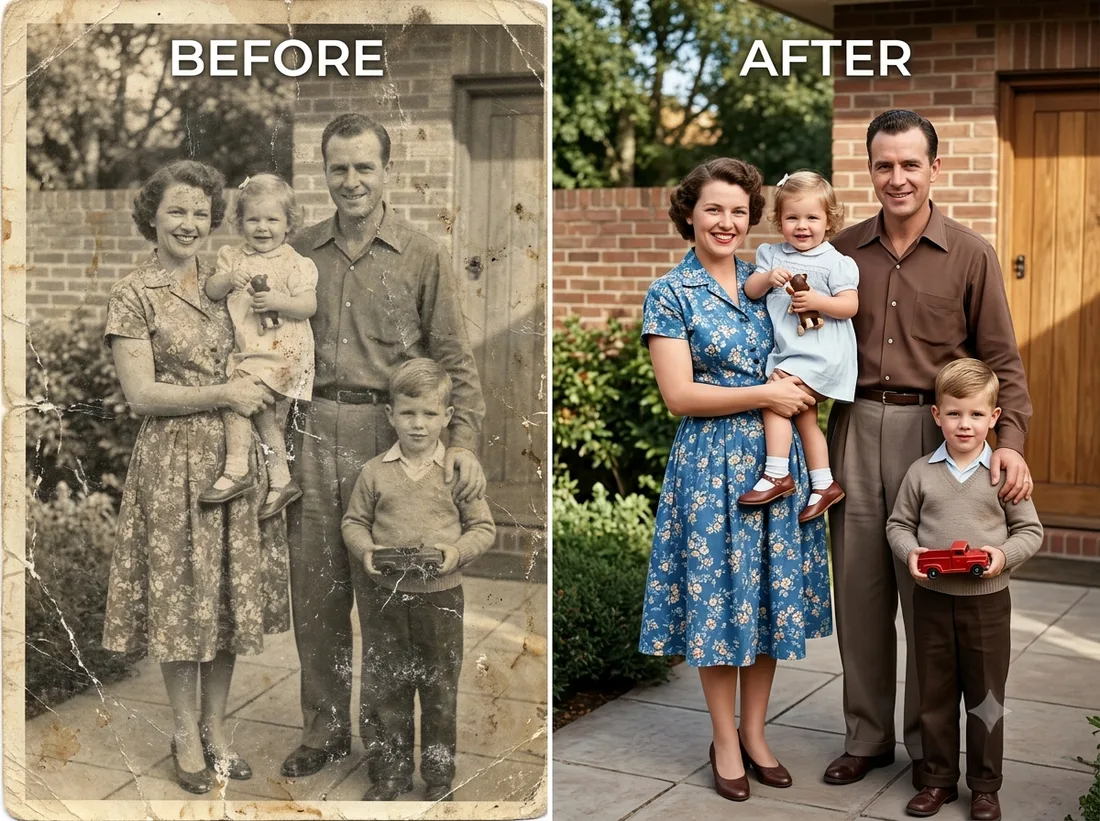
Example: before → after. Upload your image to start.
How to use the Old Photo Restoration template
- 1
A flat, evenly-lit scan or phone photo of the print — avoid glare, and include the whole border so nothing gets cropped away.
- 2
Click Generate — the AI re-renders your photo using the template prompt shown below. It runs without an account, on Shotari Basic.
- 3
The result appears right here. Re-run any time — each generation differs slightly. Downloading needs an account.
What this template does
Repairs a scanned print instead of restyling it: scratches, dust, tears, stains and fading come out, and blurred faces are reconstructed one at a time — including the small ones at the edge of a group shot. Colour is added in muted, period-appropriate tones rather than the neon clothing most auto-colourisers invent, and every person's face, pose and the original framing stay exactly as shot.
Template prompt
Fully restore this old, damaged photo to a clean, ultra-sharp, high-resolution result, as if newly taken. Remove all scratches, dust, tears, stains, blur and fading, and clearly repair and reconstruct every blurry or damaged face — eyes, skin and hair — for every person in the frame, including faces at the side, so each face looks natural, sharp and fully restored. Preserve each person's exact identity, likeness, expression, pose and the original composition; do not change anyone's face. Colorize naturally with soft, muted, period-appropriate tones and realistic skin tones; keep the colors subtle and harmonious across the whole photo, and avoid over-saturated, neon or randomly clashing clothing colors.
Frequently asked questions
Will it change what people looked like?
No. The instruction pins each person's identity, likeness, expression and pose, so the model repairs damage instead of redrawing faces. A face that was almost completely destroyed will come back softer than the rest of the frame — that is the model reconstructing from very little information, not restyling.
Why are the colours muted rather than vivid?
On purpose. The template asks for soft, period-appropriate tones and realistic skin, because over-saturated guesses at clothing colour are the single clearest giveaway that a photo was machine-colourised. Each generation varies slightly, so re-running gives you a different reading of the same palette.
Is this template free to use?
You can generate twice a day with no account at all. A free account adds 20 credits at signup plus 10 more daily. Downloading requires an account, and paid credits are what give you watermark-free output with full commercial rights; free-tier use is personal-use only.
Which model runs it, and what does it cost?
Shotari Basic by default, which costs 0 credits. You can switch to a premium model — Shotari Pro (2 credits), Seedream 5 Lite (3), GPT Image 2 (5), Nano Banana Pro (10) and others — but those bill paid credits, so they need a signed-in account with a paid balance. Without an account the job always runs on Shotari Basic and the page says so.