
Model
Remove Background People
Upload a reference photo and click Generate. You can generate free without an account — signing up unlocks downloads.
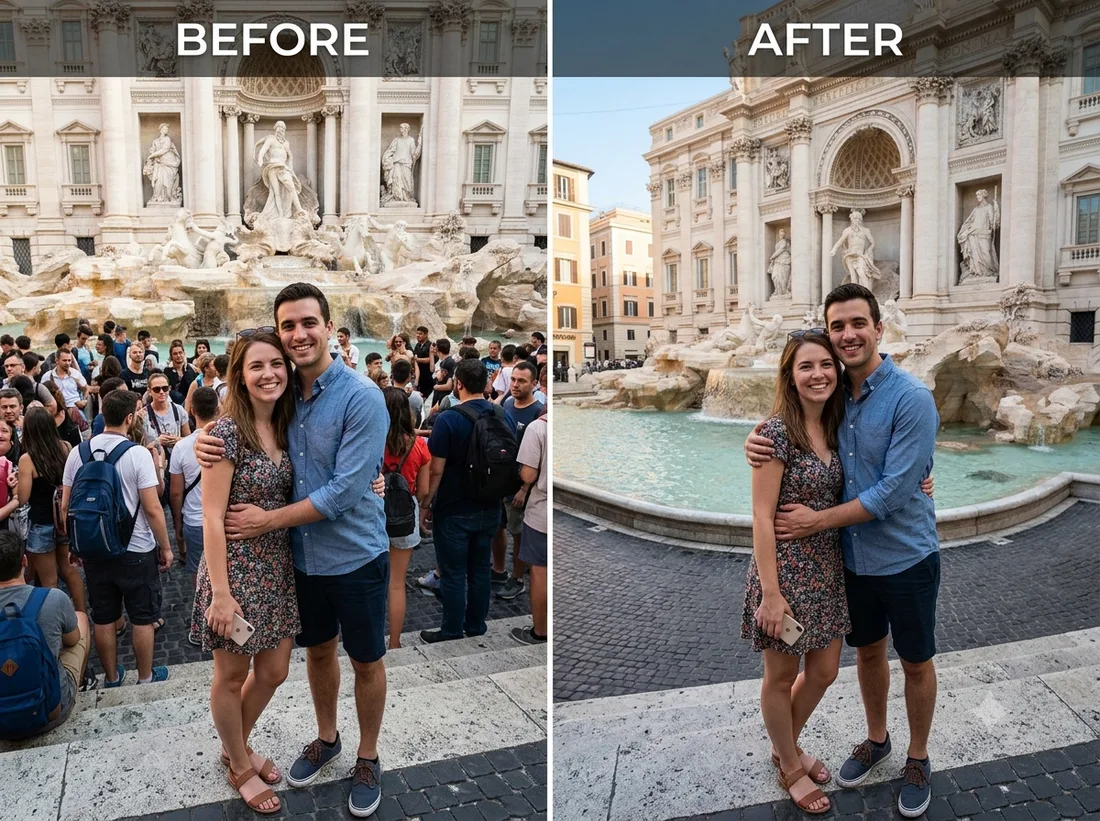
Example: before → after. Upload your image to start.
How to use the Remove Background People template
- 1
A photo where the bystanders don't overlap your subject. Once someone is standing partly behind a shoulder, the fill has to invent what was hidden.
- 2
Click Generate — the AI re-renders your photo using the template prompt shown below. It runs without an account, on Shotari Basic.
- 3
The result appears right here. Re-run any time — each generation differs slightly. Downloading needs an account.
What this template does
An editing job rather than a restyle: strangers behind the subject are removed and the gap is filled to match the surrounding scene, with the main subject left untouched. Nothing about the look of the photo changes — only what is in it.
Template prompt
Remove the unwanted people and strangers in the background, cleanly filling the area to match the scene, keeping the main subject untouched.
Frequently asked questions
Does it remove everyone in the photo?
No — the instruction targets unwanted people and strangers in the background and explicitly leaves the main subject alone. It reads 'who is the photo of' from composition, so a subject that is clearly foreground and centred gets kept most reliably.
What if a stranger overlaps my subject?
Then the model has to reconstruct whatever was behind them, and that is where artefacts appear — a smeared shoulder or an invented background edge. Expect a retry or two, and accept that heavy overlap has no clean answer.
Is this template free to use?
You can generate twice a day with no account at all. A free account adds 20 credits at signup plus 10 more daily. Downloading requires an account, and paid credits are what give you watermark-free output with full commercial rights; free-tier use is personal-use only.
Which model runs it, and what does it cost?
Shotari Basic by default, which costs 0 credits. You can switch to a premium model — Shotari Pro (2 credits), Seedream 5 Lite (3), GPT Image 2 (5), Nano Banana Pro (10) and others — but those bill paid credits, so they need a signed-in account with a paid balance. Without an account the job always runs on Shotari Basic and the page says so.