
Model
Plushie
Upload a reference photo and click Generate. You can generate free without an account — signing up unlocks downloads.
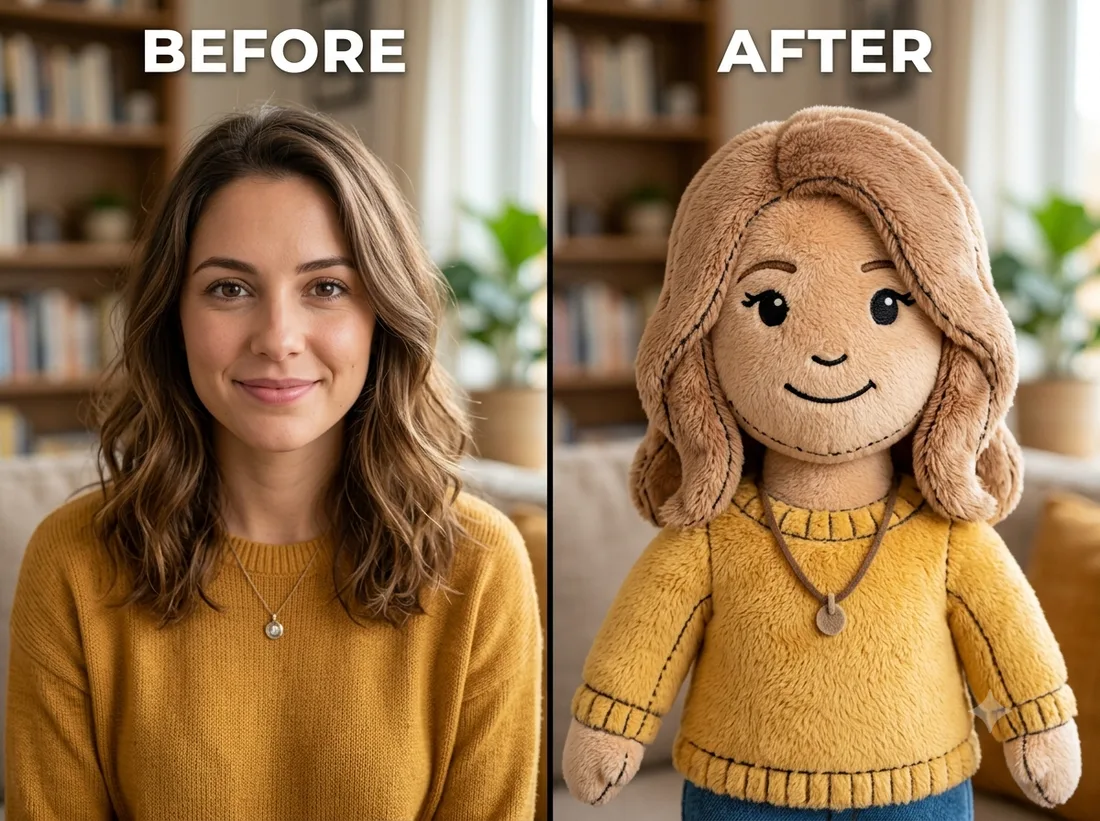
Example: before → after. Upload your image to start.
How to use the Plushie template
- 1
Works on people and pets alike. A simple, front-facing subject keeps the features readable once they're shrunk to plush scale.
- 2
Click Generate — the AI re-renders your photo using the template prompt shown below. It runs without an account, on Shotari Basic.
- 3
The result appears right here. Re-run any time — each generation differs slightly. Downloading needs an account.
What this template does
Rebuilds the subject as a soft stuffed toy — fuzzy fabric texture, visible stitching, the proportions of something you could actually hold. It is not a surface filter: the model re-imagines the subject as an object while keeping the features recognisable.
Template prompt
Turn the subject into an adorable soft plush stuffed-toy version of themselves with fuzzy fabric texture and stitching, keeping recognizable features.
Frequently asked questions
Does it work for pets?
Yes — pets are one of the strongest inputs for this template, because a plush version of an animal is a shape the model has seen far more of than a plush version of a specific person.
Why do glasses and fine details vanish?
Plush scale swallows them. Thin frames, small jewellery and printed text have no plausible fabric equivalent, so the model drops them rather than stitching something unconvincing. Bold, chunky features survive best.
Is this template free to use?
You can generate twice a day with no account at all. A free account adds 20 credits at signup plus 10 more daily. Downloading requires an account, and paid credits are what give you watermark-free output with full commercial rights; free-tier use is personal-use only.
Which model runs it, and what does it cost?
Shotari Basic by default, which costs 0 credits. You can switch to a premium model — Shotari Pro (2 credits), Seedream 5 Lite (3), GPT Image 2 (5), Nano Banana Pro (10) and others — but those bill paid credits, so they need a signed-in account with a paid balance. Without an account the job always runs on Shotari Basic and the page says so.