
Model
Girl with a Pearl
Upload a reference photo and click Generate. You can generate free without an account — signing up unlocks downloads.
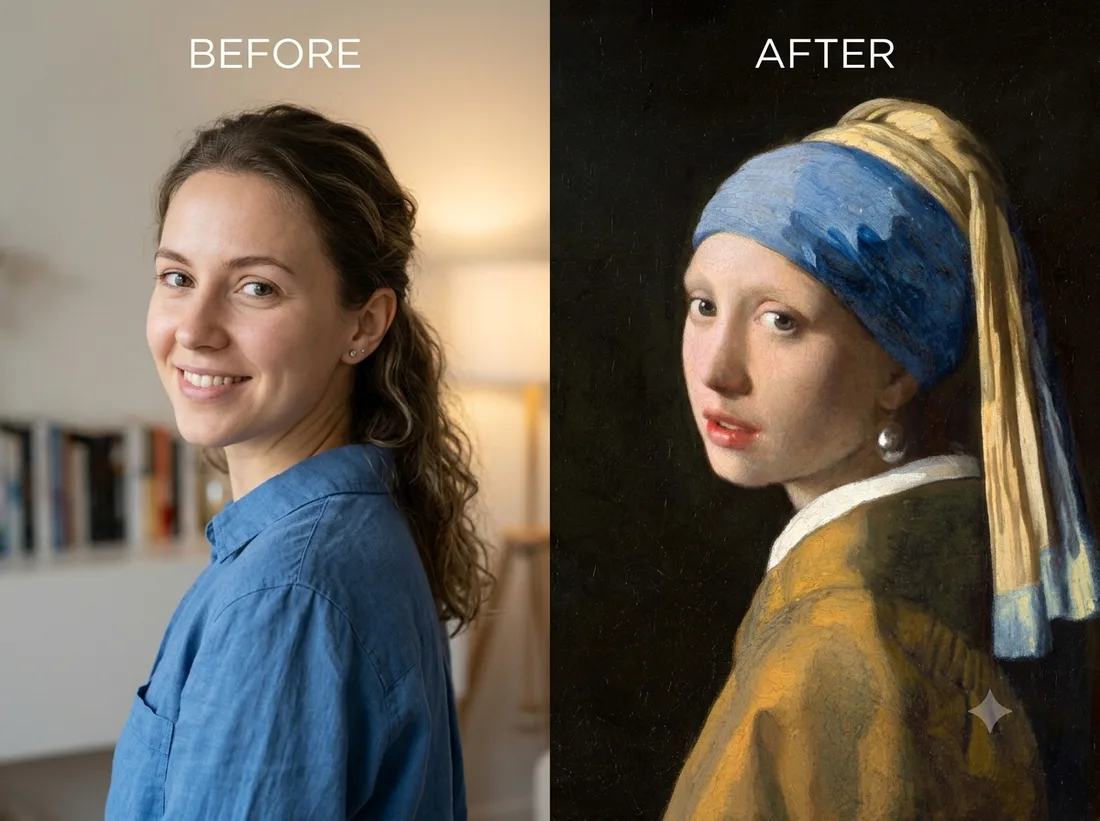
Example: before → after. Upload your image to start.
How to use the Girl with a Pearl template
- 1
A three-quarter view works best, because that is the original pose — the subject turning back over one shoulder. A straight-on portrait also works, just further from the source.
- 2
Click Generate — the AI re-renders your photo using the template prompt shown below. It runs without an account, on Shotari Basic.
- 3
The result appears right here. Re-run any time — each generation differs slightly. Downloading needs an account.
What this template does
Recreates Vermeer's 'Girl with a Pearl Earring' with your face in it: Baroque oil-paint handling, a black background, the blue-and-gold turban and the pearl. It is a costume-and-medium swap — the pose and lighting of the 1665 painting are rebuilt around the face you upload.
Template prompt
Reimagine the subject as Vermeer's 'Girl with a Pearl Earring': Baroque oil painting, dark background, blue-and-gold turban and a pearl earring, keeping their face.
Frequently asked questions
Is the painting copyrighted?
No. Vermeer painted it around 1665 and it has been in the public domain for centuries, so recreating the composition is not a rights problem. Your generated image is yours — though free-tier use is personal-use only, and paid credits are what give you clean, commercially-usable output.
Does it work for men?
Yes — the template swaps the costume, the lighting and the paint medium, not the person. The turban and pearl are applied to whoever is in the photo.
Is this template free to use?
You can generate twice a day with no account at all. A free account adds 20 credits at signup plus 10 more daily. Downloading requires an account, and paid credits are what give you watermark-free output with full commercial rights; free-tier use is personal-use only.
Which model runs it, and what does it cost?
Shotari Basic by default, which costs 0 credits. You can switch to a premium model — Shotari Pro (2 credits), Seedream 5 Lite (3), GPT Image 2 (5), Nano Banana Pro (10) and others — but those bill paid credits, so they need a signed-in account with a paid balance. Without an account the job always runs on Shotari Basic and the page says so.