
Model
Fisheye Portrait
Upload a reference photo and click Generate. You can generate free without an account — signing up unlocks downloads.
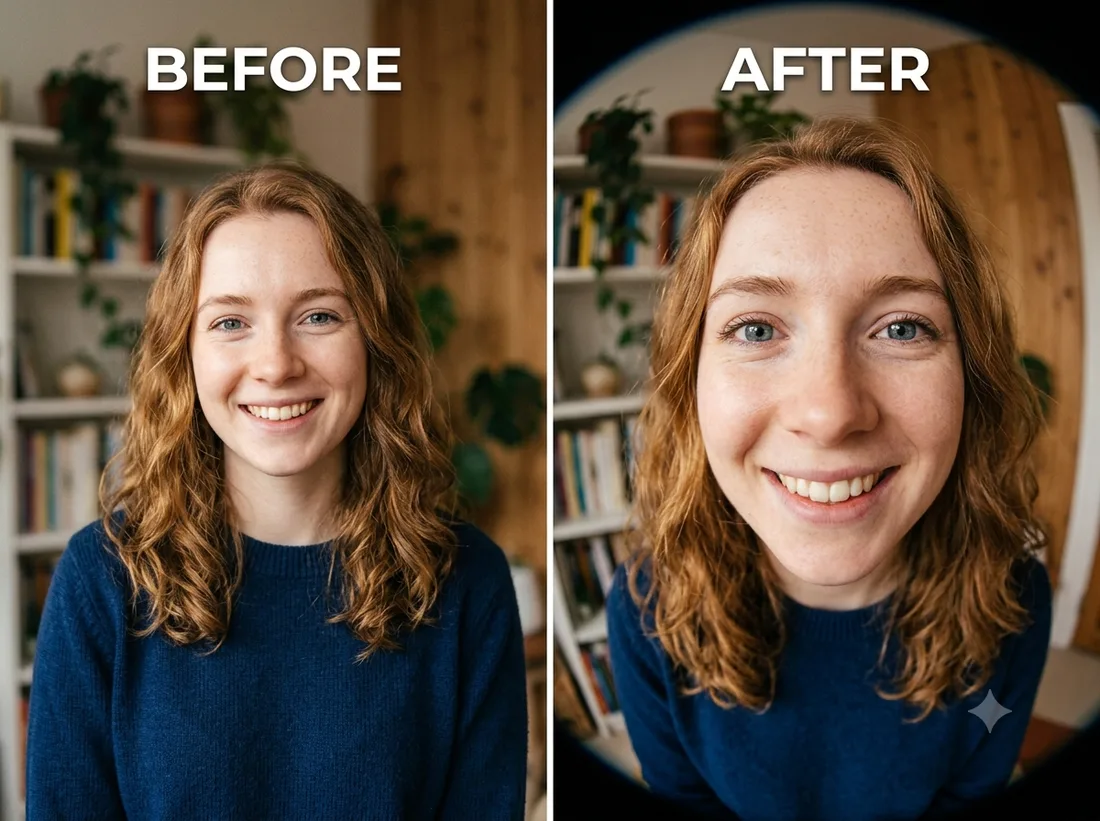
Example: before → after. Upload your image to start.
How to use the Fisheye Portrait template
- 1
A close-up of the face. A full-body or distant photo has nothing near the lens to distort, so the effect reads as a mild warp instead of a fisheye.
- 2
Click Generate — the AI re-renders your photo using the template prompt shown below. It runs without an account, on Shotari Basic.
- 3
The result appears right here. Re-run any time — each generation differs slightly. Downloading needs an account.
What this template does
A close-up shot through an exaggerated wide-angle lens: the centre of the face swells forward, the edges bend away, and the background curves around the subject. The face stays recognisable — it is the geometry that changes, not the identity.
Template prompt
Render this as a fun close-up fisheye-lens portrait with exaggerated wide-angle distortion, keeping the person's face recognizable.
Frequently asked questions
Will it make me look unflattering?
Somewhat — that is the effect. Whatever is nearest the lens (usually the nose) gets largest, which is the joke fisheye portraits are built on. If you want a wide look without the caricature, this is the wrong template.
Can I control how strong the distortion is?
No — the template has one fixed setting. Re-running gives small variations, but for a specific amount of warp you would need to describe it yourself in the editor.
Is this template free to use?
You can generate twice a day with no account at all. A free account adds 20 credits at signup plus 10 more daily. Downloading requires an account, and paid credits are what give you watermark-free output with full commercial rights; free-tier use is personal-use only.
Which model runs it, and what does it cost?
Shotari Basic by default, which costs 0 credits. You can switch to a premium model — Shotari Pro (2 credits), Seedream 5 Lite (3), GPT Image 2 (5), Nano Banana Pro (10) and others — but those bill paid credits, so they need a signed-in account with a paid balance. Without an account the job always runs on Shotari Basic and the page says so.