
Model
Dramatic B&W Portrait
Upload a reference photo and click Generate. You can generate free without an account — signing up unlocks downloads.
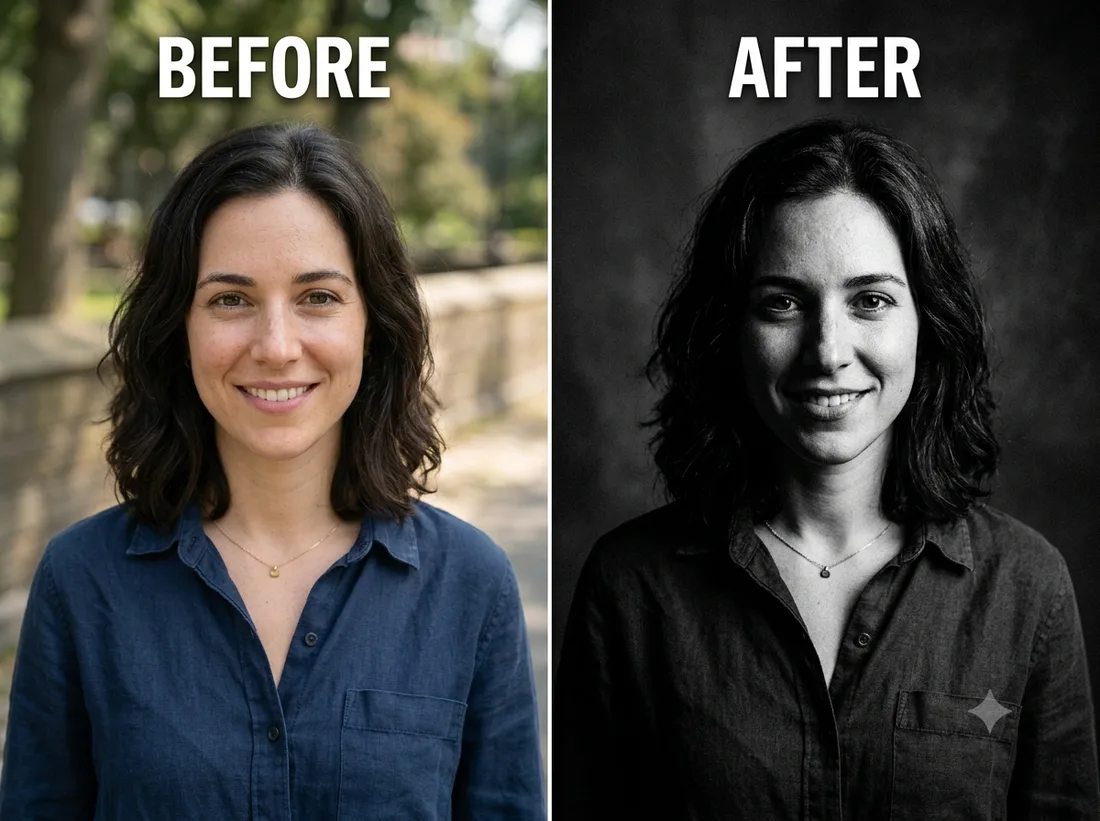
Example: before → after. Upload your image to start.
How to use the Dramatic B&W Portrait template
- 1
A portrait with visible facial structure. A flat on-camera-flash snapshot gives the relight very little to sculpt.
- 2
Click Generate — the AI re-renders your photo using the template prompt shown below. It runs without an account, on Shotari Basic.
- 3
The result appears right here. Re-run any time — each generation differs slightly. Downloading needs an account.
What this template does
A high-contrast editorial black-and-white portrait with cinematic studio lighting and deep shadows. It relights the face rather than just draining the colour out, which is why the result looks shot in a studio instead of desaturated in an app.
Template prompt
Convert this into a dramatic high-contrast black-and-white editorial portrait with cinematic studio lighting and deep shadows, preserving the person's likeness.
Frequently asked questions
How is this different from Sketch Portrait?
This stays photographic — real skin, real specular highlights, just relit and desaturated. Sketch Portrait replaces the photo with drawn pencil marks. If you want a picture that still reads as a photograph, this is the one.
Will detail disappear into the shadows?
Some will, by design — deep, clipped shadow is part of the look this template asks for. If you need detail everywhere, this is the wrong template; a plain portrait edit in the free-form editor will hold more.
Is this template free to use?
You can generate twice a day with no account at all. A free account adds 20 credits at signup plus 10 more daily. Downloading requires an account, and paid credits are what give you watermark-free output with full commercial rights; free-tier use is personal-use only.
Which model runs it, and what does it cost?
Shotari Basic by default, which costs 0 credits. You can switch to a premium model — Shotari Pro (2 credits), Seedream 5 Lite (3), GPT Image 2 (5), Nano Banana Pro (10) and others — but those bill paid credits, so they need a signed-in account with a paid balance. Without an account the job always runs on Shotari Basic and the page says so.