
Model
Holiday Card
Upload a reference photo and click Generate. You can generate free without an account — signing up unlocks downloads.
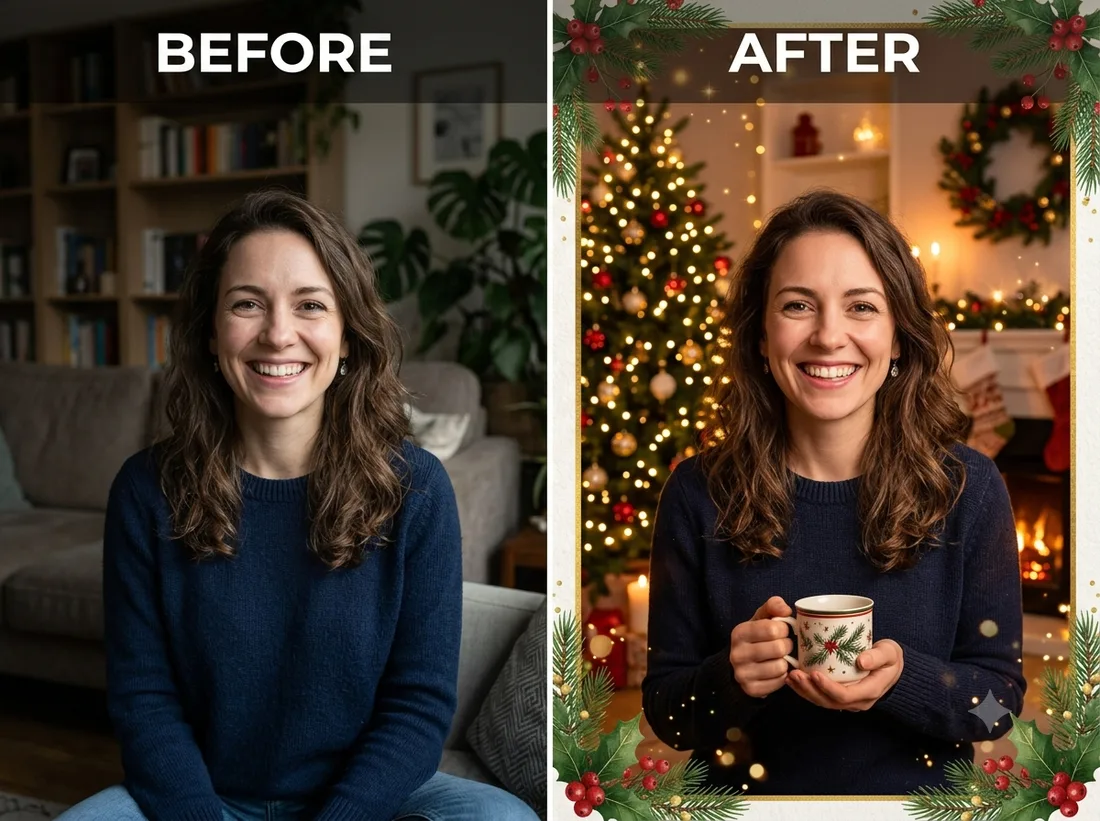
Example: before → after. Upload your image to start.
How to use the Holiday Card template
- 1
A clear portrait, couple or family shot with some empty space around the subjects — the layout needs room for the border and the greeting.
- 2
Click Generate — the AI re-renders your photo using the template prompt shown below. It runs without an account, on Shotari Basic.
- 3
The result appears right here. Re-run any time — each generation differs slightly. Downloading needs an account.
What this template does
Designs a complete greeting card rather than a portrait: the person is placed into a seasonal scene, with a decorative border and 'Happy Holidays' styling laid out around them. You get a layout, so composition and margins matter more here than facial detail.
Template prompt
Design a festive holiday greeting card featuring the person from the photo, a warm seasonal scene, decorative border and tasteful 'Happy Holidays' styling.
Frequently asked questions
Will the greeting text be spelled correctly?
Not reliably. Every current AI image model still garbles small lettering some of the time, and this template puts words directly in the frame. Check the text before you send the card, re-run if it comes back wrong, or generate it without text and add the wording yourself.
Can I change the wording?
Not from this template — the phrasing is baked into the prompt. Write your own prompt in the editor if you need a specific greeting or another language.
Is this template free to use?
You can generate twice a day with no account at all. A free account adds 20 credits at signup plus 10 more daily. Downloading requires an account, and paid credits are what give you watermark-free output with full commercial rights; free-tier use is personal-use only.
Which model runs it, and what does it cost?
Shotari Basic by default, which costs 0 credits. You can switch to a premium model — Shotari Pro (2 credits), Seedream 5 Lite (3), GPT Image 2 (5), Nano Banana Pro (10) and others — but those bill paid credits, so they need a signed-in account with a paid balance. Without an account the job always runs on Shotari Basic and the page says so.