Model
90s Yearbook Photo
Upload a reference photo and click Generate. You can generate free without an account — signing up unlocks downloads.

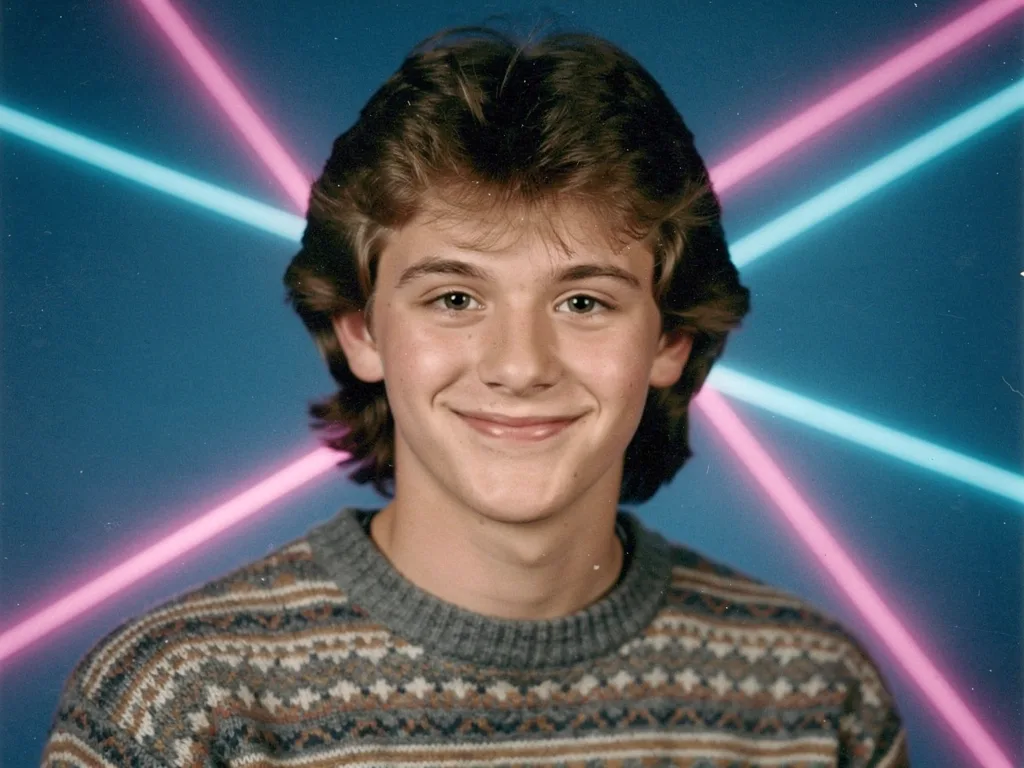
Example: before → after. Upload your image to start.
How to use the 90s Yearbook Photo template
- 1
A front-facing portrait with the shoulders in frame. That is exactly how yearbook photos were framed, so matching it gives the most convincing result.
- 2
Click Generate — the AI re-renders your photo using the template prompt shown below. It runs without an account, on Shotari Basic.
- 3
The result appears right here. Re-run any time — each generation differs slightly. Downloading needs an account.
What this template does
Restyles the photo as a 1990s American high-school yearbook portrait: the laser-beam blue studio background, soft flash lighting, a little film grain, and period-appropriate hair and clothing. The face and identity are pinned exactly — everything around them is moved back thirty years.
Template prompt
Restyle this photo as a 1990s American high school yearbook portrait: laser-beam blue studio background, soft flash lighting, slight film grain, period-appropriate hair styling and outfit. Preserve the person's exact face and identity.
Frequently asked questions
Will it change my hair?
Yes — period hair styling is written into the prompt and is a large part of why the result reads as the 90s rather than as a blue background. Your face is preserved; the styling around it is not.
Can I get the grey mottled background instead?
Not from this template — it names the laser-beam blue specifically, which is the single most recognisable yearbook backdrop of the era. Runs vary slightly in shade, but not in kind.
Is this template free to use?
You can generate twice a day with no account at all. A free account adds 20 credits at signup plus 10 more daily. Downloading requires an account, and paid credits are what give you watermark-free output with full commercial rights; free-tier use is personal-use only.
Which model runs it, and what does it cost?
Shotari Basic by default, which costs 0 credits. You can switch to a premium model — Shotari Pro (2 credits), Seedream 5 Lite (3), GPT Image 2 (5), Nano Banana Pro (10) and others — but those bill paid credits, so they need a signed-in account with a paid balance. Without an account the job always runs on Shotari Basic and the page says so.